Saturday, February 23, 2013

In Search of the 3rd Dimension and Other Technical Wonders


I spent the last few weeks in search of the 3rd dimension.  It started, however, a little over four years ago when I purchased my Samsung HL61A750 DLP TV. At the time it was the last of the DLP TV's (along with the Mitsubishi DLP's), the LCD/LED/Plasmas were starting to take hold in the market.  Although the last of what was becoming at the time of an older technology (how fast things change when you're  having a good time!) the Samsung DLP, which was rear projection, did not use the usual projection bulb - which needs to be changed out every 2-4 thousand hours of use, and can cost upwards of $200-$350!  This television used an LED light engine, which has the same MTBF as the entire set.  MTBF, for those who are curious, is Mean Time Between Failure, a number which represents the mean time until the first failure or breakdown occurs on a product.  It's a number that manufacturers use to determine how long warranties last.  So if you want to know how they can figure out how to make the product fail a week after the warranty is gone, that's how......

My Samsung TV was 3D ready, BUT this was prior to when  the HDMI Ver. 1.4 standards were set, which ultimately did not include the checkerboard 3D format the Mitsubishi and Samsung DLP TV's used.  I figured I was out of luck and did not really pursue the matter further.  Last December I was talking to my brother in Arizona, and he said I should figure it out, because he felt 3D adds allot to movies - although I think it looks cool, I was still not convinced.  In the meantime i visited a friend that has a 3d TV, and I was impressed enough to do some checking to see what was possible.   Seeing my friend's setup was a bit of encouragement - it looked a whole lot better than what I've seen running at Best Buy.  I don't wonder that Best buy is having problems when they do such a crappy job of setup of the things they are trying to sell.

SO:

1. Mitsubishi came out with a 3D converter box that allows the DLP sets made by both Mitsubishi and Samsung to use any 3D source - PS3, BluRay, DirecTV, etc.  $560.  There are two versions of this box, and the earlier version (cost about $450) seems to 'kind of work' with the Samsung DLP tv's, the later one is definitely designed to .  Either way, I won't spend that much on a 4 1/2 year old TV!  I can get a new set that has 3D on it  - Vizio has a 3D 42" set for $500.  This is not an option that I would consider.

2. Use software on the computer (my HTPC). I found that Cyberlink PowerDVD has 3d output - including checkerboard.  Might be promising, and am emailing their tech support to see what can make it happen.  I found that the anaglyph setting (blue red glasses) works, but the colors are way off, and of course there is a definite decrease in brightness.  I can set the output to checkerboard, but the TV doesn't recognize the signal. This is going to be a lot of playing around to try to figure out what settings are causing problems, and with everything else on the HTPC  (Home Theater PC) I am reluctant to screw things up.

3. It turns out that Panasonic's 3D BluRay players have built in checkerboard for the DLP sets made by both  Mitsubishi and Samsung.  I bought a compatible emitter for my Samsung DLP set with two pairs of glasses, and got a refurbished Panny BluRay player for $60 - and voila!  3D that looks great!  I am very impressed with the results.

So the pursuit of the 3rd dimension has been successful.  I am still going to see about getting the software solution working (reluctanty), but am unsure of what that particular outcome will be.  I know that the video card I have in the HTPC should be capable  - it's an ATI/AMD HD Radeon 6670 - and the 6XXX series does 3D - but between the drivers and the software and who knows what else it's pretty convoluted at best.

The other thing I've been doing is 3D as well - upgrading my A/V receiver for better surround sound.  The Panasonic BluRay player that I got has only DTS sound out of BluRay discs, so I needed to get something that would recognize the new audio codecs that seem to be increasing almost daily.  The receiver I was replacing is an Onkyo - with 65 watts x 5 channels (simultaneously!)  and was fairly high end when I got it back in '97.  I figured around 500-600 I could get something decent, but found a great deal at 1saleaday.com1saleaday.com has really great prices, but apparently the guys in shipping only work 1 or 2 days a month, and their 7-10 day shipping guarantee works out to 15-35 days, depending on whim, weather or mayhaps hot flashes or something.   They had a Sherwood Newcastle R-972 7.1 surround receiver for $299.95, refurbished.  Tests online indicate 68Watts/channel all channels driven.  Retail on the unit is $1800.   Got it a few days ago, and its gonna take another month to figure all the stuff out on it!  Sounds Great!

So now I have to check out some 3d movies that I purchased.  See you later, I'll be busy!


Friday, December 28, 2012

Taking Mom to Nellis Air Force Base

Elizabeth 'Betty Wall' Strohfus  (Mom!)

  
I escorted Mom - Elizabeth "Betty Wall"  Strohfus - to Nellis Air Force Base Near Las Vegas Nevada.  She was a WASP (Womens Air Force Service Pilot) during WWII, and had been invited by the Airforce to Nellis Air Force Base in Las Vegas. My impression of  Las Vegas was amazement that anyone would want a town built in the middle of a gravel pit!  We arrived at the airport and brother Kevin picked us up and took us to the hotel/resort Aliante in North Vegas.  Mom's room had a lovely view of the hotel swimming pool and the huge gravel pit beyond, with beautiful mountains in the background. 

On the Bus

Thursday we were taken to Nellis Air Force Base,  where we were met by a team of archaeologists.  The archeologist are working to correct a history that they wrote that did not include the 10 WASPs that performed training duties at the base in 1943-1944.  The records that mentioned them had still been sealed, and the archeologists were interested in correcting the history.  (The last time mom was at Nellis, if was an Army airfield, and it was 1944!)  After being loaded into an air-conditioned bus with mom, my two brothers, my sister and her daughter, Mom's sister, three photographers and two film crews with the archeologists, we headed for the Thunderbird's Hanger.

A number of years ago a young girl met mom after listening to one of her presentations and became inspired to become a pilot.  As a teen she wrote  a story about mom, and on Thursday, that young lady, Major Caroline Jenson, Thunderbird #3, Welcomed mom to the Thunderbird hanger.

A Magic Moment


We were all led into the hanger where we met the rest of the Thunderbird pilots, and mom had her autograph book (provided by the Air Force) autographed by the rest of the thunderbirds.


Thunderbird Pilots
                                                               

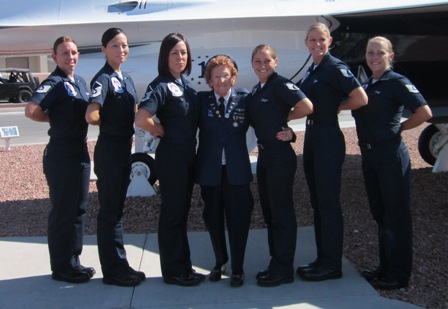
We were then led out to the airfield where we watched the Thunderbirds prepare for takeoff  and leave for an air show at McConnell Air Force Base, Kansas.   After watching the preparation for takeoff  and the takeoff, we spent some time in the Thunderbird museum.  After we left the museum we were met by the female ground crew members and mom had more new friends!

New Friends

Female Ground Crew Members with Mom


 We were loaded into the bus and taken to the control tower.  One of the archeologists mentioned that very few people are allowed into the control tower,  and when they are, Cameras are never allowed.  We were told that our cameras were okay!  (I don't know what the difference was!) 


The Control Tower with two film crews


The archeologists were very surprised to find that the office in the control tower had a picture of the airfield from 1943, they had not seen or even known existed.  They were thrilled to see it!
 
Las Vegas Army Air Base, 1944


We were encouraged to go out on the outside deck (access through a 2 foot by 2 foot door) and when were out there, we were to see a landing.  The aircraft (an F16) made initially a flyby (I got a great video but the vice commander of the base said NOT to share it!) and the plane landed.

After lunch, we relaxed for a while and then mom gave her program to some members of the airbase.  She was introduced by the 99th Air Base Wing Vice Commander  Col. Carol C. Yannarella, who presented mom with the Diamondback award for outstanding performance as a WASP at the Las Vegas Army Airfield, Nevada.
Receiving the Diamond back Award

Giving her Presentation


The next day, Friday, my sister Juli and I accompanied mom back to Nellis to the base television studio, where a documentary crew interviewed her for almost 4 hours.


We were told that she was definitely the first female instrument instructor at the Las Vegas airfield, and probably the first ever in the Army Air corps.

It was an amazing trip. 

Art Roberts

The Weather Station Project and Bad Design.


One of my projects has been to repair my weather station.  A year (or two??!!) ago, I took the station down because the anemometer was not working - the bearings were sticking, and the rain gauge was indicating dozens of inches of rain on dry days.  So I ordered another OWW (One Wire Weather) station - with just the anemometer, direction and temperature sensor device, hoping to repair the rain gauge.  The original  unit is 10 years old, and I wasn't certain the thing mechanically could be repaired.

Well, the new station arrived, and I decided to attempt to repair the old station first.  I used some WD40 to soak the bearings and then dried them, and applied some graphite to help with lubrication.  Got it working, and also was able to get the rain sensor working again as well. 

So then I (for ease of testing, mostly) downloaded the new (simple to use)  OWW station software.  The software I normally use is Weather-display, which supports virtually every computerized weather station hardware ever made, and has more features than can be imagined. It has the ability to interface with other software like HomeSeer, and many others.  It has a web page editor, ability to download weather forecasts/maps/photos/metars and more, can do email alerts, voice announcements of weather or alerts, and even will interface to my Envi Current cost power meter.  It takes quite a bit of time to get it setup the way I like it, so a simpler way of testing this new OWW station is nice.

So.  I really didn't pay too much attention to what was inside (I should've, though) - the case is clear.  One problem with the earlier version of this station is the housing is obviously  enclosed, which heats up, so the temperature is a couple of degrees too high on warm days.  I assumed the new one would be the same.  NOT.  WORSE.

The original OWW station uses ibutton sensors.  Dallas Semiconductor Corp. designed the ibutton, which is a computer chip with a sensor, and sometimes eprom/ram/electronic switches  in a small metal coin sized container, (although the guts are also available as chips).  It has a ground wire, and uses the second wire as both low speed data and 5v power.  The older station I have has a few sensor chips and reed relays to provide wind speed and direction, and a temperature sensor for temperature.  Very simple, effective, and it has worked really well.  And as with most devices, moving parts tend to wear, which is where the maintenance is going to happen. 


The NEW station.  I really don't know what the hell the designer was thinking when this thing was put down on paper.  Mechanically, its almost identical, same shape, except clear plastic where the first unit is white, and almost identical in size.  The new bus they are using has 8 wires, not 2.  (actually, the first used phone wire, so it used 4, so if  you wanted to run longer wires, the data and power could be separated).  The new bus provides two grounds, for power and data and 2x +5 and +12 v power.   It should be illegal for some people to be engineers.  This guy decided, gee, we could add a simple micro to this thing.  Keep in mind it has the same sensors as the original unit (which worked fine with a 70 foot cable).  I think the idea for the micro was to make the data more stable over longer distance cable runs. That makes sense, but what about the heat from the additional electronics, with regulators supplying power?  And also, lets make the case clear.  That's cool!  Since the case is clear, the micro, which is reading data from the sensors, can do other stuff.  Like turn the 20 super bright RED LEDs on and off.  And turn the 16 superbright blue LEDs on and off.  And flash them!!!!!!!   DAMN!  HOW COOL IS THAT??????  WOW!  Now I have to be concerned with 777 aircraft thinking I'm running a landing strip.  A BEACON that can probably be seen from space.  OH.  And something I never would have thought of - the temperature sensor is NO LONGER GOING TO FREEZE!  THIS IS FANTASTIC!  NOT. Its running almost 20 degrees warmer with the LED's on, and 10+ degrees warmer when flashing! WONDERFUL!  And even when the stupid LED's are off, the thing is still typically 4-5 degrees warmer than the actual temperature because of the additional electronics.


 I do believe I did not buy an extra weather station, I bought a space beacon!  Or, perhaps, parts to keep the old one working.  I'm sure as hell not putting that thing on my roof!


Art Roberts

A Sensible Alternative to Cable or Satellite TV


As I approached retirement, I started to look at monthly expenses and tried to find ways  to free up a little cash.  Not because I'm going to find things tight monetarily, but rather just to be able to save for extra expenses.  One of the areas I thought about saving with was my Satellite TV expense.  Here's why.

I have become rather tired of Satellite TV as of late.  The programs I tend to want to watch are history documentaries, science programs, shows on how to do it yourself - gardening, etc.  I found over the last several years that the history channel (lower case because they aren't) has given up on history - all they are busy doing now is trying to make it up with truck driving alligator hunting pawn broking rusty antique hunters looking for ancient astronauts.  The discovery channel isn't any better - more reality programs season after season that barely deserve one show, much less 5+ seasons of the crap.  The Science fiction channel has end of the world movies - either by weather, monsters, earthquakes or outer space debris.  Oh.  And they dumped an actual Science fiction program for wrestling, have a makeup program, and an entire evening looking for ghosts.  The Science channel,  part of the Discovery network, now has some decent science fiction (?!!??) with very little science, and one of the decent networks left, the Smithsonian Network, has been showing only reruns for the past 3 years.  Arts and entertainment channel used to have it, now they don't.  HGTV seems to be hooked on selling houses, buying houses for insane amounts of money in foreign countries, or an occasional remodel, but the remodel is damned expensive.  The DIY channel still has good programs, but even there, if you  pay attention, bathroom remodel s can be $20,000 and up, with kitchens being even more insane!  I once redid a bathroom in a Queen Anne Victorian, with custom tile, antique soak tub, new stool, sink and wiring and more for less than $2000, so I have no idea what the hell these folks are thinking.

So I dumped satellite with no intension to return.  I read more now, and found lots of interesting stuff on YouTube, (including some hilarious clips of old variety shows - check out Dean Martin, Tim Conway, and especially what's my line!)  There is also a number of excellent websites that specialize in documentaries, listing them by category, and free TV shows from various networks.  The problem is you have to hunt each of these things down on the internet and that can take a bit of time. 

There is an alternative to cable and satellite, and it is on your computer.  XBMC, the Xbox Media Center.  It is a free, open source media player and entertainment center for your digital media.  It has versions that work on Linux, Windows, OSX, Raspberry Pi.  You should have at least a 2GHz dual core or better CPU, and an ATI Radeon X800 or newer, or an Intel GMA 945G or newer, or an Nividia Geforce 6-series or newer to run.  If you have an older machine laying around, it will, with XBMC make a wiz bang HTPC -Home Theater PC!

I have the latest version of XBMC, Frodo, and it supports a TV tuner (in my case, Hauppauge),  it will support an FM tuner if you have it, it will play back video, audio, DVD's, can be setup to play back Blu ray if you have a drive installed, and has access to tons of add ons.

If you install it, one can go to add-ons for video - and add on such things as PBS videos, DIY channel videos, HGTV videos, and see full programs.  It seems that as many cable channels are converting to 16x9 HD content, the older SD 4x3 content is being released on the internet for viewing, and these add-ons make this content easy to find and watch.  DOZENS of excellent programs - gardening, remodeling, landscaping, and more.  The PBS add-on has many full episodes of NOVA, POV and lots more.  The YouTube add-on allows you to search for your favorites clips.  I've just watched a couple of great gardening shows, and an episode of NOVA on medieval cathedrals!  Also, the clip of Tim Conway doing the elephant routine is an absolute scream on YouTube!

The ITunes add-on allows searching of all of the many Podcasts available.  You can also specify local directories for video and audio, and play all of the content on the computer.  And if you have attached the computer to your TV, it is a full blown Entertainment center!

It has add-ons called scrapers, that grab metadata information and artwork for music, videos, and TV shows.  There are add-ons to grab lyrics to your favorite songs, weather add-ons, web interface add-ons, photo add-ons and lots more.  If you have a video or music library, there are add-ons to watch the directory for any changes and keep the library up to date.

Earlier versions of XBMC had problems with Live TV, but the latest build (Frodo) that I am using only needs to have a TV server software installed, and then enable the add-on for that server.  I am using NextPVR, which seems to work .  It does have some klutzy interface issues, making it difficult to change channels, but it is a step in the right direction, and I'm sure the software will continue to improve in the future.  Since I typically use the TV for watching TV, this isn't an issue.  Also I find this software really great for watching all of the programs that I liked to watch on satellite, listening to music, and watching recorded TV.

ADDED August, 2015

Currently DISH network has added a nice cable/satellite alternative - SLING TV.  If you go to www.sling.com, you can sign up and pay about $20 a month for about 15 or so cable channels, and add program packs for $5 each, like kids tv, news, sports and more!  Check it out!

The following websites will get you started:

This is the home page of XBMC, where you can download the software for your particular OS, get skins, plug-ins  and more for the XBMC software.


This is a complete guide to building your own 'kickass' media center PC.


An install guide specifically for MS Windows.


Doing this on the cheap from scratch.


Installing XBMC Linux in 15 minutes!


Building the hardware, with guide for $400, $600, and $1000. Also has PDF with the latest recommendations.


This has a list of some of the best add-ons for XBMC.

Happy Entertainment!

Art Roberts